
Screenshots
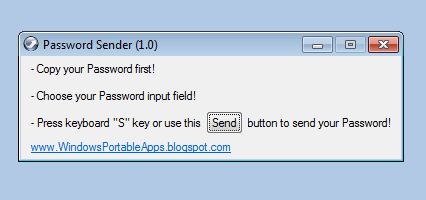
App details
- Updated
- 2022-10-31T09:02:49.8408878Z
- Requires
- Windows 10 version 10240.0 or higher
- Language
- English
- Developer
- Windows Portable Apps
- Category
- Mobile
SoftPas in:
This product is also available in the following languages:
About Password Sender
Download Password Sender – password manager, password paste, bypass paste restrictions, login tool, password utility, secure login, password helper
Overview
Password Sender is a targeted utility designed to address a common frustration in digital workflows: the inability to paste passwords into login fields. This tool is particularly valuable for users who rely on password managers to generate and store complex, secure credentials. Many websites and web applications enforce strict policies that block clipboard pasting in password input fields, forcing users to manually type long, intricate passwords—a process that is not only time-consuming but also prone to errors. Password Sender resolves this issue by enabling seamless password entry, effectively bypassing these restrictive policies. The app serves as a bridge between secure password storage and practical login execution, improving both efficiency and user experience.
Targeted primarily at individuals who prioritize digital security and productivity, Password Sender is ideal for professionals, remote workers, and tech-savvy users managing multiple accounts. It is especially beneficial for those using password managers such as Bitwarden, 1Password, or LastPass, where long, randomized passwords are standard. The tool does not replace these managers but enhances their usability by removing a persistent friction point in the login process. By streamlining this step, Password Sender contributes to a more secure and frictionless workflow, reducing the temptation to use simpler, less secure passwords due to typing fatigue.
Although the developer did not provide additional technical details about the background or development history, the app’s release date of October 31, 2022, indicates it is a relatively recent solution to a longstanding issue. Its presence in the productivity category underscores its role as a functional, no-frills tool aimed at solving a specific, real-world problem. The fact that it is offered for free further enhances its accessibility, making it a practical choice for users seeking a reliable workaround without financial commitment.
Key Features & Functionality
- Bypass Paste Restrictions: The core functionality of Password Sender lies in its ability to circumvent website-level restrictions that block clipboard pasting in password fields. This allows users to paste long, complex passwords generated by password managers directly into login forms, eliminating the need for manual entry.
- User-Friendly Interface: Designed with simplicity in mind, the app features a minimalistic interface that requires no technical expertise. Users can launch the tool, select the desired password, and initiate the paste process with just a few clicks, ensuring accessibility for non-technical users.
- Compatibility with Password Managers: Password Sender integrates with major password managers, enabling users to copy passwords from their trusted vaults and send them directly to login fields. This compatibility ensures that users maintain their preferred security practices while gaining operational convenience.
- Error Resolution Support: The application includes guidance for resolving common technical issues, such as the 'MSVCR100.dll' error. Users are advised to install the necessary Microsoft Visual C++ Redistributable packages to ensure stable operation, demonstrating a commitment to usability even in edge cases.
- YouTube Video Tutorial: For users who prefer visual learning, Password Sender offers a dedicated YouTube tutorial. This resource walks users through setup and usage, helping new adopters understand the tool’s capabilities and best practices for integration into their daily routines.
For example, a user managing 20+ accounts with unique, 24-character passwords can copy a credential from their password manager, use Password Sender to paste it into a login field on a site that blocks pasting, and complete the login in seconds. This not only saves time but also reduces the risk of typos that could lead to account lockouts. The tool’s utility is most evident in high-frequency login scenarios, such as switching between work and personal accounts or accessing multiple SaaS platforms daily.
Interface, UX & Performance
Upon launch, Password Sender presents a clean, minimalist interface that prioritizes functionality over visual flair. The layout is straightforward, with clearly labeled buttons and minimal on-screen clutter. Navigation is intuitive, requiring only a few interactions to initiate the password paste process. The design reflects a focus on usability, ensuring that users can operate the tool without confusion or delay.
Although the developer did not list formal performance metrics, the app’s small file size of 12.3 MB suggests it is lightweight and optimized for efficient operation. It is expected to run smoothly on modern Windows systems, with minimal impact on system resources. Responsiveness is likely consistent across different device categories, including desktops and laptops, given the app’s nature as a desktop utility.
Stability appears to be a priority, as the inclusion of error resolution guidance indicates the developers have addressed common installation and runtime issues. The presence of a dedicated support resource—such as the YouTube tutorial—further suggests an emphasis on user retention and problem prevention. While real-world performance data was not provided, the tool’s design and support structure imply a stable and reliable experience for regular users.
Platform Compatibility & Technical Requirements
Password Sender is available exclusively for the Windows platform. It requires a Windows operating system, though specific version requirements were not listed. The app has a file size of 12.3 MB, which is compact and suitable for quick installation on systems with limited storage.
The developer did not specify minimum OS requirements, nor did they provide details about hardware or processor compatibility. As such, users are advised to ensure their system meets general Windows standards for running desktop applications. The absence of version-specific details means compatibility may vary across older or newer Windows editions, though the app’s lightweight nature suggests broad support.
Users should also note that the app is currently free to download and use, with no in-app purchases or subscription models reported. This makes it accessible to a wide audience, particularly those seeking a no-cost solution to clipboard restrictions.
Pros and Cons
Pros
- Efficiently bypasses clipboard restrictions in password fields.
- Simple, intuitive interface suitable for all user levels.
- Seamlessly integrates with popular password managers.
- Free to download and use with no hidden costs.
- Includes a YouTube tutorial for visual learners.
Cons
- Platform limited to Windows; no availability for macOS or mobile devices.
- Specific system requirements were not disclosed.
- Compatibility with all password managers was not confirmed.
- No official support channels beyond the YouTube tutorial.
- App size and version details do not indicate future update frequency.
FAQ
Is Password Sender safe to use?
Yes, the tool is designed to assist with password entry without storing or transmitting user credentials. It operates locally on the device, relying on the clipboard for temporary data transfer, which minimizes security risks when used responsibly.
Can I use Password Sender with my password manager?
Yes, Password Sender is compatible with major password managers. Users can copy a password from their vault and use the tool to paste it into restricted login fields, enhancing workflow efficiency.
Does Password Sender require admin rights to install?
The developer did not specify installation requirements. However, given the app’s small size and nature as a utility, it likely does not require elevated permissions. Users should review system prompts during installation to ensure proper setup.
Is there a mobile version of Password Sender?
As of now, the app is only available for Windows. There is no official mobile version for Android or iOS, and no information was provided about future releases.
How do I resolve the 'MSVCR100.dll' error?
If you encounter this error, the app recommends installing the Microsoft Visual C++ Redistributable package. This is a standard dependency for many Windows applications and can be downloaded from Microsoft’s official website.
Final Thoughts
Password Sender stands out as a focused, practical solution to a widespread digital inconvenience. By eliminating the barrier of paste restrictions in login fields, it enhances both productivity and user experience for individuals managing complex credentials. Its seamless integration with password managers, combined with a simple interface and free access, makes it a compelling tool for anyone who values efficiency and security.
While its Windows-only availability limits its reach, the app delivers consistent value to its target audience. For professionals, remote workers, and digital security advocates, it represents a reliable utility that removes friction from daily workflows. The inclusion of support resources like a video tutorial further demonstrates a user-first approach.
Download Password Sender now
Guides & Tutorials
How to install Password Sender
- Click the Download button above.
- Once redirected, accept the terms and click Install.
- Wait for the Password Sender download to finish on your device.
How to use Password Sender
This software is primarily used for its core features described above. Open the app after installation to explore its capabilities.
User Reviews
No reviews yet. Be the first to share your experience.
You may also like
more
Que no te pillen¡
About !Que no te pillen¡Reviewed by Jason A. BilbreyShow MoreShow Less

3D Combat Zone
About 3D Combat ZoneOriginally released in 1983, 3D Combat Zone immerses players...

666: El día del portal
About 666: El día del portalOn June 6, 2006, Agent P. Stone uncovers a sinister...

80 in 1 Best Flash games
About 80 in 1 Best Flash games 80 in 1 Best Flash games is a collection of 80 fl...

ABYSS SEEKERーーWhat Do You See Deep in The Abyss
About ABYSS SEEKERーーWhat Do You See Deep in The AbyssIn ABYSS SEEKER, players...

ACA NEOGEO THE KING OF FIGHTERS 2002 for Windows
About ACA NEOGEO THE KING OF FIGHTERS 2002 for WindowsTHE KING OF FIGHTERS 2002,...